BigQuery Agent Analytics plugin for ADK¶
Version Requirement
Use ADK Python version 1.26.0 or higher for auto-schema-upgrade, tool provenance tracking, and HITL event tracing, and 1.27.0 or higher for automatic view creation.
The ADK 2.0 multi-agent workflow features in this document — the
AGENT_TRANSFER, AGENT_STATE_CHECKPOINT, EVENT_COMPACTION, and
TOOL_PAUSED event types, the attributes.adk envelope, and the ADK 2.0
views and columns — require a newer build of the plugin. As of this writing
that support is present on google/adk-python main but is not yet in a
published release (it is not in v2.2.0, the latest release). See Agent
workflow and pause/resume events (ADK 2.0) for details.
The BigQuery Agent Analytics Plugin significantly enhances Agent Development Kit (ADK) by providing a robust solution for in-depth agent behavior analysis. Using the ADK Plugin architecture and the BigQuery Storage Write API, it captures and logs critical operational events directly into a Google BigQuery table, empowering you with advanced capabilities for debugging, real-time monitoring, and comprehensive offline performance evaluation.
Python version 1.26.0 adds Auto Schema Upgrade (safely add new columns to existing tables), Tool Provenance tracking (LOCAL, MCP, SUB_AGENT, A2A, TRANSFER_AGENT, TRANSFER_A2A), and HITL Event Tracing for human-in-the-loop interactions. Version 1.27.0 adds Automatic View Creation (generate flat, query-friendly event views).
Support for ADK 2.0 multi-agent workflows extends tracing to agent
transfers, state checkpoints, event compaction, and long-running tools. It adds
four new event types — AGENT_TRANSFER, AGENT_STATE_CHECKPOINT,
EVENT_COMPACTION, and TOOL_PAUSED — and stamps an attributes.adk envelope
on every row so you can reconstruct the agent execution graph and join a paused
tool to the row that resumes it. See Agent workflow and pause/resume events
(ADK 2.0) for the event details and the release that includes
this support.
The plugin includes three reliability and observability fixes:
- Cross-region Storage Write API routing. Writes to BigQuery datasets
outside the
USmulti-region (for exampleEUornorthamerica-northeast1) now route to the region that owns the write stream. Previously they could fail with a "session not found" / stream-not-found error and silently drop every row. - Dropped-event observability. Dropped rows are tracked per drop reason
(
queue_full,arrow_prep_failed,retry_exhausted,non_retryable,unexpected_error) and exposed viaBigQueryAgentAnalyticsPlugin.get_drop_stats()so a host can poll and export the counts to its own monitoring. - No duplicate spans in Cloud Trace. When Agent Engine telemetry
(
GOOGLE_CLOUD_AGENT_ENGINE_ENABLE_TELEMETRY=true) or any other Cloud Trace exporter is wired to the global tracer provider, the plugin no longer produces a duplicate span next to each framework span. The plugin still inheritstrace_idfrom the ambient OTel span, so BigQuery rows continue to join cleanly to Cloud Trace traces.
BigQuery Storage Write API
This feature uses BigQuery Storage Write API, which is a paid service. For information on costs, see the BigQuery documentation.
Use cases¶
- Agent workflow debugging and analysis: Capture a wide range of plugin lifecycle events (LLM calls, tool usage) and agent-yielded events (user input, model responses), into a well-defined schema.
- High-volume analysis and debugging: Logging operations are performed asynchronously using the Storage Write API to allow high throughput and low latency.
- Multimodal Analysis: Log and analyze text, images, and other modalities. Large files are offloaded to GCS, making them accessible to BigQuery ML via Object Tables.
- Distributed Tracing: Built-in support for OpenTelemetry-style tracing
(
trace_id,span_id) to visualize agent execution flows. - Tool Provenance: Track the origin of each tool call (local function, MCP server, sub-agent, A2A remote agent, or transfer agent).
- Human-in-the-Loop (HITL) Tracing: Dedicated event types for credential requests, confirmation prompts, and user input requests.
- Agent Workflow Tracing (ADK 2.0): Capture agent transfers, state
checkpoints, event compaction, and long-running tool pause/resume, with an
attributes.adkenvelope for reconstructing the execution graph. - Queryable Event Views: Automatically create flat, per-event-type BigQuery
views (e.g.,
v_llm_request,v_tool_completed) to simplify downstream analytics by unnesting JSON payload data.
Captured events summary¶
The following table lists all event types the plugin logs. For detailed payload
examples, see Event types and payloads. The View column
shows the BigQuery view optionally created when
create_views is enabled (the default).
| Event Type | Captured When | Key Payload Fields | View |
|---|---|---|---|
USER_MESSAGE_RECEIVED |
A user message enters the invocation | text summary / content parts | v_user_message_received |
INVOCATION_STARTING |
An invocation begins | (common columns only) | v_invocation_starting |
INVOCATION_COMPLETED |
An invocation ends | (common columns only) | v_invocation_completed |
AGENT_STARTING |
Agent execution begins | instruction summary | v_agent_starting |
AGENT_COMPLETED |
Agent execution ends | latency | v_agent_completed |
LLM_REQUEST |
A model request is sent | model, prompt, config, tools | v_llm_request |
LLM_RESPONSE |
A model response is received | response, usage tokens, cache metadata, latency, TTFT | v_llm_response |
LLM_ERROR |
A model call fails | error message, latency | v_llm_error |
TOOL_STARTING |
A tool begins execution | tool name, args, origin | v_tool_starting |
TOOL_COMPLETED |
A tool succeeds | tool name, result, origin, latency | v_tool_completed |
TOOL_ERROR |
A tool fails | tool name, args, origin, error, latency | v_tool_error |
STATE_DELTA |
Session state changes | state delta | v_state_delta |
HITL_CREDENTIAL_REQUEST |
Credential request is emitted | synthetic tool name, args | v_hitl_credential_request |
HITL_CONFIRMATION_REQUEST |
Confirmation request is emitted | synthetic tool name, args | v_hitl_confirmation_request |
HITL_INPUT_REQUEST |
User input request is emitted | synthetic tool name, args | v_hitl_input_request |
HITL_CREDENTIAL_REQUEST_COMPLETED |
User provides credential response | synthetic tool name, result | (base table only) |
HITL_CONFIRMATION_REQUEST_COMPLETED |
User provides confirmation response | synthetic tool name, result | (base table only) |
HITL_INPUT_REQUEST_COMPLETED |
User provides input response | synthetic tool name, result | (base table only) |
A2A_INTERACTION |
Remote A2A call completes | response, task ID, context ID, request/response | v_a2a_interaction |
AGENT_RESPONSE |
Final agent response is yielded | response (content), source event ID/author/branch (attributes) | v_agent_response |
AGENT_TRANSFER |
One agent hands off control to another | from agent, to agent, source event ID | v_agent_transfer |
AGENT_STATE_CHECKPOINT |
An agent snapshots its state (or marks the end of its run) | agent state, end-of-agent flag, source event ID | v_agent_state_checkpoint |
EVENT_COMPACTION |
A window of events is compacted into a summary | window start/end timestamps, compacted content | v_event_compaction |
TOOL_PAUSED |
A long-running tool (or HITL request) suspends, awaiting resumption | tool name, args, pause kind, function call ID | v_tool_paused |
Quickstart¶
Add the plugin to your agent's App object. For prerequisites, see
Prerequisites.
import os
from google.adk.agents import Agent
from google.adk.apps import App
from google.adk.models.google_llm import Gemini
from google.adk.plugins.bigquery_agent_analytics_plugin import BigQueryAgentAnalyticsPlugin

os.environ['GOOGLE_CLOUD_PROJECT'] = 'your-gcp-project-id'
os.environ['GOOGLE_CLOUD_LOCATION'] = 'us-central1'
os.environ['GOOGLE_GENAI_USE_VERTEXAI'] = 'True'

plugin = BigQueryAgentAnalyticsPlugin(
    project_id="your-gcp-project-id",
    dataset_id="your-big-query-dataset-id",
)

root_agent = Agent(
    model=Gemini(model="gemini-flash-latest"),
    name='my_agent',
    instruction="You are a helpful assistant.",
)

app = App(
    name="my_agent",
    root_agent=root_agent,
    plugins=[plugin],
)
Add the plugin to your runner's plugins list. For prerequisites, see Prerequisites.
import com.google.adk.agents.LlmAgent;
import com.google.adk.agents.RunConfig;
import com.google.adk.models.Gemini;
import com.google.adk.plugins.Plugin;
import com.google.adk.plugins.agentanalytics.BigQueryAgentAnalyticsPlugin;
import com.google.adk.plugins.agentanalytics.BigQueryLoggerConfig;
import com.google.adk.runner.InMemoryRunner;
import com.google.common.collect.ImmutableList;

public final class Agent {
  public static void main(String[] args) throws Exception {
    Plugin bqLoggingPlugin = new BigQueryAgentAnalyticsPlugin(
        BigQueryLoggerConfig.builder()
            .projectId("your-gcp-project-id")
            .datasetId("your-big-query-dataset-id")
            .tableName("agent_events") // Optional, defaults to "events" in Java
            .build());

    InMemoryRunner runner = new InMemoryRunner(
        LlmAgent.builder()
            .model(Gemini.builder().modelName("gemini-2.5-flash").build())
            .name("my_agent")
            .instruction("You are a helpful assistant.")
            .build(),
        "my_agent",
        ImmutableList.of(bqLoggingPlugin));

    // Use runner ...

    // Close runner to flush and close plugin
    runner.close().blockingAwait();
  }
}
Run and test agent¶
Test the plugin by running the agent and making a few requests through the chat
interface, such as "tell me what you can do" or "List datasets in my cloud
project
SELECT timestamp, event_type, content
FROM `your-gcp-project-id.your-big-query-dataset-id.agent_events`
ORDER BY timestamp DESC
LIMIT 20;
Full example with GCS offloading, OpenTelemetry, and BigQuery tools
# my_bq_agent/agent.py
import os
import google.auth
from google.adk.apps import App
from google.adk.plugins.bigquery_agent_analytics_plugin import BigQueryAgentAnalyticsPlugin, BigQueryLoggerConfig
from google.adk.agents import Agent
from google.adk.models.google_llm import Gemini
from google.adk.tools.bigquery import BigQueryToolset, BigQueryCredentialsConfig


# --- OpenTelemetry note (no setup required for BQAA) ---
# The BQAA plugin does NOT export OTel spans of its own. It tracks the
# parent-child hierarchy on an internal stack: the root invocation span
# reuses the ambient OTel span's id (as a 16-hex string) when one is
# active, and child BQAA spans are generated internally as 16-hex
# strings. The plugin's `trace_id`
# column inherits from whichever OpenTelemetry span is active in the
# surrounding runtime when the agent runs:
#   * Agent Engine wires its invocation span automatically, so
#     `trace_id` in BigQuery joins to Cloud Trace out of the box.
#   * Locally, framework-instrumented runners open an invocation span
#     for you.
#   * If neither is available, the plugin falls back to a per-invocation
#     trace_id and the parent-child hierarchy is still preserved in
#     BigQuery — no OTel setup needed.
# Setting a bare `TracerProvider` with no ambient span will NOT cause
# `trace_id` to be populated with a "real" OTel id; only an *active*
# span does. See the "Tracing and observability" section for details.

# --- Configuration ---
PROJECT_ID = os.environ.get("GOOGLE_CLOUD_PROJECT", "your-gcp-project-id")
DATASET_ID = os.environ.get("BIG_QUERY_DATASET_ID", "your-big-query-dataset-id")
# GOOGLE_CLOUD_LOCATION must be a valid Agent Platform region (e.g., "us-central1").
# BQ_LOCATION is the BigQuery dataset location, which can be a multi-region
# like "US" or "EU", or a single region like "us-central1".
VERTEX_LOCATION = os.environ.get("GOOGLE_CLOUD_LOCATION", "us-central1")
BQ_LOCATION = os.environ.get("BQ_LOCATION", "US")
GCS_BUCKET = os.environ.get("GCS_BUCKET_NAME", "your-gcs-bucket-name") # Optional

if PROJECT_ID == "your-gcp-project-id":
    raise ValueError("Please set GOOGLE_CLOUD_PROJECT or update the code.")

# --- CRITICAL: Set environment variables BEFORE Gemini instantiation ---
os.environ['GOOGLE_CLOUD_PROJECT'] = PROJECT_ID
os.environ['GOOGLE_CLOUD_LOCATION'] = VERTEX_LOCATION
os.environ['GOOGLE_GENAI_USE_VERTEXAI'] = 'True'

# --- Initialize the Plugin with Config ---
bq_config = BigQueryLoggerConfig(
    enabled=True,
    gcs_bucket_name=GCS_BUCKET, # Enable GCS offloading for multimodal content
    log_multi_modal_content=True,
    max_content_length=500 * 1024, # 500 KB limit for inline text
    batch_size=1, # Default is 1 for low latency, increase for high throughput
    shutdown_timeout=10.0
)

bq_logging_plugin = BigQueryAgentAnalyticsPlugin(
    project_id=PROJECT_ID,
    dataset_id=DATASET_ID,
    table_id="agent_events", # default table name is agent_events
    config=bq_config,
    location=BQ_LOCATION
)

# --- Initialize Tools and Model ---
credentials, _ = google.auth.default(scopes=["https://www.googleapis.com/auth/cloud-platform"])
bigquery_toolset = BigQueryToolset(
    credentials_config=BigQueryCredentialsConfig(credentials=credentials)
)

llm = Gemini(model="gemini-flash-latest")

root_agent = Agent(
    model=llm,
    name='my_bq_agent',
    instruction="You are a helpful assistant with access to BigQuery tools.",
    tools=[bigquery_toolset]
)

# --- Create the App ---
app = App(
    name="my_bq_agent",
    root_agent=root_agent,
    plugins=[bq_logging_plugin],
)
package adk.plugins.agentanalytics.demo;

import static java.nio.charset.StandardCharsets.UTF_8;
import static java.util.Collections.singletonList;

import com.google.adk.agents.LlmAgent;
import com.google.adk.agents.RunConfig;
import com.google.adk.events.Event;
import com.google.adk.models.Gemini;
import com.google.adk.plugins.Plugin;
import com.google.adk.plugins.agentanalytics.BigQueryAgentAnalyticsPlugin;
import com.google.adk.plugins.agentanalytics.BigQueryLoggerConfig;
import com.google.adk.runner.InMemoryRunner;
import com.google.adk.sessions.Session;
import com.google.adk.tools.FunctionTool;
import com.google.adk.tools.ToolContext;
import com.google.genai.types.Content;
import com.google.genai.types.GenerateContentConfig;
import com.google.genai.types.Part;
import io.opentelemetry.sdk.OpenTelemetrySdk;
import io.opentelemetry.sdk.common.CompletableResultCode;
import io.opentelemetry.sdk.trace.SdkTracerProvider;
import io.opentelemetry.sdk.trace.data.SpanData;
import io.opentelemetry.sdk.trace.export.SimpleSpanProcessor;
import io.opentelemetry.sdk.trace.export.SpanExporter;
import io.reactivex.rxjava3.core.Flowable;
import java.util.Collection;
import java.util.Scanner;

/** Demo agent showing how to use BigQueryAgentAnalyticsPlugin. */
public final class BqDemoAgent {
  private static final String PROJECT_ID = "your-gcp-project-id";
  private static final String DATASET_ID = "your-gcp-dataset_id";
  private static final String TABLE_ID = "your-gcp-table";
  private static final String GCS_BUCKET_NAME = "your-gcs-bucket-name";
  private static final String API_KEY = "your-api_key";

  // A simple tool to demonstrate tool execution logging
  public static String reverseString(String input, ToolContext toolContext) {
    return new StringBuilder(input).reverse().toString();
  }

  public static void main(String[] args) throws Exception {
    // 0. Initialize OpenTelemetry
    initOpenTelemetry();

    // 1. Configure the BigQuery Logger
    BigQueryLoggerConfig config =
        BigQueryLoggerConfig.builder()
            .projectId(PROJECT_ID)
            .datasetId(DATASET_ID)
            .tableName(TABLE_ID)
            .gcsBucketName(GCS_BUCKET_NAME)
            .createViews(true)
            .build();

    // 2. Create the plugin instance
    Plugin bqLoggingPlugin = new BigQueryAgentAnalyticsPlugin(config);

    // 3. Initialize the model (Gemini)
    Gemini model =
        Gemini.builder()
            .modelName("gemini-3-flash-preview") // Use appropriate model
            .apiKey(API_KEY)
            .build();

    // 4. Create the agent with the tool and plugin
    LlmAgent agent =
        LlmAgent.builder()
            .model(model)
            .name("bq_demo_agent")
            .instruction(
                "You are a helpful assistant. You have a tool 'reverseString' that you can use to"
                    + " reverse text.")
            .tools(FunctionTool.create(BqDemoAgent.class, "reverseString"))
            .generateContentConfig(GenerateContentConfig.builder().temperature(0.5f).build())
            .build();

    // 5. Initialize the runner
    InMemoryRunner runner =
        new InMemoryRunner(agent, "bq_demo_agent", singletonList(bqLoggingPlugin));

    // 6. Create a session
    Session session =
        runner.sessionService().createSession(runner.appName(), "demo_user").blockingGet();

    RunConfig runConfig = RunConfig.builder().build();

    System.out.println("Agent ready. Type 'quit' to exit.");

    try (Scanner scanner = new Scanner(System.in, UTF_8)) {
      while (true) {
        System.out.print("\nUser: ");
        String userInput = scanner.nextLine();
        if (userInput.trim().equalsIgnoreCase("quit")) {
          break;
        }

        Content userMsg = Content.fromParts(Part.fromText(userInput));

        // Run the agent and stream events
        Flowable<Event> events =
            runner.runAsync(session.userId(), session.id(), userMsg, runConfig);

        System.out.print("Agent: ");
        events.blockingForEach(
            event -> {
              if (event.finalResponse()) {
                System.out.println(event.stringifyContent());
              }
            });
      }
    } finally {
      System.out.println("Closing runner (flushing remaining logs)...");
      runner.close().blockingAwait();
      System.out.println("Done.");
    }
  }

  private static void initOpenTelemetry() {
    PrintingSpanExporter exporter = new PrintingSpanExporter();
    SdkTracerProvider tracerProvider =
        SdkTracerProvider.builder().addSpanProcessor(SimpleSpanProcessor.create(exporter)).build();
    OpenTelemetrySdk.builder().setTracerProvider(tracerProvider).buildAndRegisterGlobal();
  }

  private static class PrintingSpanExporter implements SpanExporter {
    @Override
    public CompletableResultCode export(Collection<SpanData> spans) {
      for (SpanData span : spans) {
        System.out.println("--- Span: " + span.getName() + " ---");
        System.out.println("  TraceId: " + span.getTraceId());
        System.out.println("  SpanId: " + span.getSpanId());
        System.out.println("  ParentSpanId: " + span.getParentSpanId());
        System.out.println("  Attributes: " + span.getAttributes());
        System.out.println("------------------------");
      }
      return CompletableResultCode.ofSuccess();
    }

    @Override
    public CompletableResultCode flush() {
      return CompletableResultCode.ofSuccess();
    }

    @Override
    public CompletableResultCode shutdown() {
      return CompletableResultCode.ofSuccess();
    }
  }

  private BqDemoAgent() {}
}
Deploying to Agent Runtime?
Prerequisites¶
- Google Cloud Project with the BigQuery API enabled.
- BigQuery Dataset: Create a dataset to store logging tables before using the plugin. The plugin automatically creates the necessary events table within the dataset if the table does not exist.
- Google Cloud Storage Bucket (Optional): If you plan to log multimodal content (images, audio, etc.), creating a GCS bucket is recommended for offloading large files.
- Authentication:
- Local: Run
gcloud auth application-default login. - Cloud: Ensure your service account has the required permissions.
- Local: Run
Note: Gemini model selector gemini-flash-latest
Most code examples in ADK documentation use gemini-flash-latest to select
the latest available
Gemini Flash version. However, if you access Gemini from a regional
endpoint, such as us-central1, this selection string may not work. In that
case, use a specific model version string from the Gemini
models page or Google Cloud
Gemini
models
list.
IAM permissions¶
For the agent to work properly, the principal (e.g., service account, user account) under which the agent is running needs these Google Cloud roles:
roles/bigquery.jobUserat Project Level to run BigQuery queries.roles/bigquery.dataEditorat Table Level to write log/event data.- If using GCS offloading:
roles/storage.objectCreatorandroles/storage.objectVieweron the target bucket.
Configuration options¶
Constructor parameters¶
The BigQueryAgentAnalyticsPlugin constructor accepts these parameters. It also
accepts **kwargs, which are forwarded directly to BigQueryLoggerConfig (see
below).
| Parameter | Type | Default | Use when |
|---|---|---|---|
project_id |
str |
(required) | Select the Google Cloud project |
dataset_id |
str |
(required) | Select the BigQuery dataset |
table_id |
Optional[str] |
None |
Use a custom table name (overrides config table_id) |
config |
Optional[BigQueryLoggerConfig] |
None |
Pass a config object for detailed tuning |
location |
str |
"US" |
Match the BigQuery dataset location (e.g., "US", "EU", "us-central1") |
credentials |
Optional[google.auth.credentials.Credentials] |
None |
Use explicit service-account, impersonated, or cross-project credentials instead of ADC |
plugin = BigQueryAgentAnalyticsPlugin(
    project_id="my-project",
    dataset_id="my_dataset",
    batch_size=10,           # forwarded to BigQueryLoggerConfig
    shutdown_timeout=5.0,    # forwarded to BigQueryLoggerConfig
)
BigQueryLoggerConfig options¶
All options below are optional and have sensible defaults. Pass them to
BigQueryLoggerConfig or as **kwargs to the plugin constructor.
| Option | Type | Default | Use when |
|---|---|---|---|
enabled |
bool |
True |
Temporarily disable logging |
table_id |
str |
"agent_events" |
Use a custom table name (constructor value takes precedence) |
clustering_fields |
List[str] |
["event_type", "agent", "user_id"] |
Customize table clustering on creation |
gcs_bucket_name |
Optional[str] |
None |
Offload large text and multimodal content to GCS |
connection_id |
Optional[str] |
None |
Use BigQuery ObjectRef / object tables (e.g., us.my-connection) |
max_content_length |
int |
500 * 1024 |
Control inline payload size before offloading/truncating |
batch_size |
int |
1 |
Tune write throughput vs. latency |
batch_flush_interval |
float |
1.0 |
Flush partial batches periodically (seconds) |
shutdown_timeout |
float |
10.0 |
Wait for final flush on shutdown (seconds) |
event_allowlist |
Optional[List[str]] |
None |
Log only selected event types |
event_denylist |
Optional[List[str]] |
None |
Skip sensitive or noisy event types |
content_formatter |
Optional[Callable] |
None |
Apply custom masking/formatting per event (receives (content, event_type)) |
log_multi_modal_content |
bool |
True |
Capture content_parts details including GCS references |
queue_max_size |
int |
10000 |
Bound the in-memory event queue |
retry_config |
RetryConfig |
RetryConfig() |
Tune retry behavior (max_retries=3, initial_delay=1.0, multiplier=2.0, max_delay=10.0) |
log_session_metadata |
bool |
True |
Add session info to attributes (session_id, app_name, user_id, state). Keys prefixed temp: or secret: are redacted. |
custom_tags |
Dict[str, Any] |
{} |
Add static tags (e.g., {"env": "prod"}) to every event's attributes |
auto_schema_upgrade |
bool |
True |
Automatically add new columns to existing tables (additive only) |
create_views |
bool |
True |
Create per-event-type BigQuery views (1.27.0+) |
view_prefix |
str |
"v" |
Avoid view-name collisions when multiple plugins share a dataset (e.g., "v_staging") |
The following code sample shows how to define a configuration for the BigQuery Agent Analytics plugin:
import json
import re

from google.adk.plugins.bigquery_agent_analytics_plugin import BigQueryLoggerConfig

def redact_dollar_amounts(event_content: Any, event_type: str) -> str:
    """
    Custom formatter to redact dollar amounts (e.g., $600, $12.50)
    and ensure JSON output if the input is a dict.

    Args:
        event_content: The raw content of the event.
        event_type: The event type string (e.g., "LLM_REQUEST", "LLM_RESPONSE").
    """
    text_content = ""
    if isinstance(event_content, dict):
        text_content = json.dumps(event_content)
    else:
        text_content = str(event_content)

    # Regex to find dollar amounts: $ followed by digits, optionally with commas or decimals.
    # Examples: $600, $1,200.50, $0.99
    redacted_content = re.sub(r'\$\d+(?:,\d{3})*(?:\.\d+)?', 'xxx', text_content)

    return redacted_content

config = BigQueryLoggerConfig(
    enabled=True,
    event_allowlist=["LLM_REQUEST", "LLM_RESPONSE"], # Only log these events
    # event_denylist=["TOOL_STARTING"], # Skip these events
    shutdown_timeout=10.0, # Wait up to 10s for logs to flush on exit
    max_content_length=500, # Truncate content to 500 chars
    content_formatter=redact_dollar_amounts, # Redact the dollar amounts in the logging content
    queue_max_size=10000, # Max events to hold in memory
    auto_schema_upgrade=True, # Automatically add new columns to existing tables
    create_views=True, # Automatically create per-event-type views
    # retry_config=RetryConfig(max_retries=3), # Optional: Configure retries
)

plugin = BigQueryAgentAnalyticsPlugin(
    project_id="my-project",
    dataset_id="my_dataset",
    config=config,
)
In Java, all configuration is managed via the BigQueryLoggerConfig builder.
BigQueryLoggerConfig Builder options¶
| Builder Method | Type | Default | Description |
|---|---|---|---|
enabled(boolean) |
boolean |
true |
Temporarily disable logging |
projectId(String) |
String |
(required) | Select the Google Cloud project |
datasetId(String) |
String |
"agent_analytics" |
Select the BigQuery dataset |
tableName(String) |
String |
"events" |
Use a custom table name (Note: defaults to "events", unlike Python's "agent_events") |
location(String) |
String |
"us" |
Match the BigQuery dataset location |
clusteringFields(List<String>) |
List<String> |
["event_type", "agent", "user_id"] |
Customize table clustering on creation |
gcsBucketName(String) |
String |
"" |
Offload large text and multimodal content to GCS |
connectionId(String) |
String |
null |
Use BigQuery ObjectRef / object tables |
maxContentLength(int) |
int |
500 * 1024 |
Control inline payload size before offloading/truncating |
batchSize(int) |
int |
1 |
Tune write throughput vs. latency |
batchFlushInterval(Duration) |
Duration |
Duration.ofSeconds(1) |
Flush partial batches periodically |
shutdownTimeout(Duration) |
Duration |
Duration.ofSeconds(10) |
Wait for final flush on shutdown |
eventAllowlist(List<String>) |
List<String> |
[] |
Log only selected event types |
eventDenylist(List<String>) |
List<String> |
[] |
Skip sensitive or noisy event types |
contentFormatter(BiFunction) |
BiFunction<Object, String, Object> |
null |
Apply custom masking/formatting per event |
logMultiModalContent(boolean) |
boolean |
true |
Capture content_parts details including GCS references |
queueMaxSize(int) |
int |
10000 |
Bound the in-memory event queue |
retryConfig(RetryConfig) |
RetryConfig |
RetryConfig.builder().build() |
Tune retry behavior |
logSessionMetadata(boolean) |
boolean |
true |
Add session info to attributes |
customTags(Map<String, Object>) |
Map<String, Object> |
{} |
Add static tags to every event's attributes |
autoSchemaUpgrade(boolean) |
boolean |
true |
Automatically add new columns to existing tables |
createViews(boolean) |
boolean |
false |
Create per-event-type BigQuery views (Note: defaults to false, unlike Python's true) |
viewPrefix(String) |
String |
"v" |
Avoid view-name collisions |
credentials(Credentials) |
Credentials |
null |
Use explicit service-account credentials |
The following code sample shows how to define a configuration for the BigQuery Agent Analytics plugin in Java:
import com.google.adk.plugins.agentanalytics.BigQueryAgentAnalyticsPlugin;
import com.google.adk.plugins.agentanalytics.BigQueryLoggerConfig;
import java.time.Duration;
import java.util.function.BiFunction;

// Custom formatter to redact dollar amounts
BiFunction<Object, String, Object> redactDollarAmounts = (content, eventType) -> {
  String textContent = content.toString();
  return textContent.replaceAll("\\$\\d+(?:,\\d{3})*(?:\\.\\d+)?", "xxx");
};

BigQueryLoggerConfig config = BigQueryLoggerConfig.builder()
    .enabled(true)
    .projectId("my-project")
    .datasetId("my_dataset")
    .tableName("agent_events")
    .batchSize(1)
    .batchFlushInterval(Duration.ofMillis(500))
    .contentFormatter(redactDollarAmounts)
    .autoSchemaUpgrade(true)
    .createViews(true)
    .build();

BigQueryAgentAnalyticsPlugin plugin = new BigQueryAgentAnalyticsPlugin(config);
Schema and production setup¶
Schema Reference¶
The events table (agent_events) uses a flexible schema. The following table
provides a comprehensive reference with example values.
| Field Name | Type | Mode | Description | Example Value |
|---|---|---|---|---|
| timestamp | TIMESTAMP |
REQUIRED |
UTC timestamp of event creation. Acts as the primary ordering key and the daily partitioning key. Precision is microsecond. | 2026-02-03 20:52:17 UTC |
| event_type | STRING |
NULLABLE |
The canonical event category. Standard values include LLM_REQUEST, LLM_RESPONSE, LLM_ERROR, TOOL_STARTING, TOOL_COMPLETED, TOOL_ERROR, AGENT_STARTING, AGENT_COMPLETED, STATE_DELTA, INVOCATION_STARTING, INVOCATION_COMPLETED, USER_MESSAGE_RECEIVED, HITL events (see HITL events), and the ADK 2.0 workflow events AGENT_TRANSFER, AGENT_STATE_CHECKPOINT, EVENT_COMPACTION, and TOOL_PAUSED (see Agent workflow and pause/resume events). Used for high-level filtering. |
LLM_REQUEST |
| agent | STRING |
NULLABLE |
The name of the agent responsible for this event. Defined during agent initialization or via the root_agent_name context. |
my_bq_agent |
| session_id | STRING |
NULLABLE |
A persistent identifier for the entire conversation thread. Stays constant across multiple turns and sub-agent calls. | 04275a01-1649-4a30-b6a7-5b443c69a7bc |
| invocation_id | STRING |
NULLABLE |
The unique identifier for a single execution turn or request cycle. Corresponds to trace_id in many contexts. |
e-b55b2000-68c6-4e8b-b3b3-ffb454a92e40 |
| user_id | STRING |
NULLABLE |
The identifier of the user (human or system) initiating the session. Extracted from the User object or metadata. |
test_user |
| trace_id | STRING |
NULLABLE |
32-character hex Trace ID. Inherited from the ambient OpenTelemetry span when one is active (e.g. Agent Engine's invocation span or the ADK Runner span) so BigQuery rows join cleanly to your existing Cloud Trace traces; otherwise generated by the plugin per invocation. Links all operations within a single distributed request lifecycle. | a2c7f13d3a3f0bbb8793692f76a6012a |
| span_id | STRING |
NULLABLE |
16-character hex Span ID identifying this specific atomic operation. Tracked on the plugin's internal stack, not exported as an OTel span — the plugin does not call tracer.start_span against your configured OpenTelemetry provider. The root invocation span reuses the ambient OTel span's id when one is active; child spans are generated internally (see Tracing and observability). |
3916f5762bcd4d42 |
| parent_span_id | STRING |
NULLABLE |
16-character hex Span ID of the immediate caller. Used to reconstruct the parent-child execution tree (DAG). | 4c4a42bfdeb84934 |
| content | JSON |
NULLABLE |
The primary event payload. Structure is polymorphic based on event_type. |
{"system_prompt": "You are...", "prompt": [{"role": "user", "content": "hello"}], "response": "Hi", "usage": {"total": 15}} |
| attributes | JSON |
NULLABLE |
Metadata/Enrichment (usage stats, model info, tool provenance, custom tags). | {"model": "gemini-flash-latest", "usage_metadata": {"total_token_count": 15}, "session_metadata": {"session_id": "...", "app_name": "...", "user_id": "...", "state": {}}, "custom_tags": {"env": "prod"}} |
| latency_ms | JSON |
NULLABLE |
Performance metrics. Standard keys are total_ms (wall-clock duration) and time_to_first_token_ms (streaming latency). |
{"total_ms": 1250, "time_to_first_token_ms": 450} |
| status | STRING |
NULLABLE |
High-level outcome. Values: OK (success) or ERROR (failure). |
OK |
| error_message | STRING |
NULLABLE |
Human-readable exception message or stack trace fragment. Populated only when status is ERROR. |
Error 404: Dataset not found |
| is_truncated | BOOLEAN |
NULLABLE |
true if content or attributes exceeded the BigQuery cell size limit (default 10MB) and were partially dropped. |
false |
| content_parts | RECORD |
REPEATED |
Array of multi-modal segments (Text, Image, Blob). Used when content cannot be serialized as simple JSON (e.g., large binaries or GCS refs). | [{"mime_type": "text/plain", "text": "hello"}] |
The plugin automatically creates the table if it does not exist. For production, you can optionally create the table manually using the DDL below.
Manual DDL for production setup
CREATE TABLE `your-gcp-project-id.adk_agent_logs.agent_events`
(
  timestamp TIMESTAMP NOT NULL OPTIONS(description="The UTC time at which the event was logged."),
  event_type STRING OPTIONS(description="Indicates the type of event being logged (e.g., 'LLM_REQUEST', 'TOOL_COMPLETED')."),
  agent STRING OPTIONS(description="The name of the ADK agent or author associated with the event."),
  session_id STRING OPTIONS(description="A unique identifier to group events within a single conversation or user session."),
  invocation_id STRING OPTIONS(description="A unique identifier for each individual agent execution or turn within a session."),
  user_id STRING OPTIONS(description="The identifier of the user associated with the current session."),
  trace_id STRING OPTIONS(description="32-char hex trace ID. Inherited from the ambient OpenTelemetry span when one is active; otherwise generated per invocation by the plugin."),
  span_id STRING OPTIONS(description="16-char hex span ID for this specific operation. Tracked on the plugin's internal stack; the root invocation span may reuse the ambient OTel span id, while child BQAA spans are generated internally. No OpenTelemetry span is created or exported."),
  parent_span_id STRING OPTIONS(description="16-char hex span ID of the immediate caller, used to reconstruct the parent-child execution tree."),
  content JSON OPTIONS(description="The event-specific data (payload) stored as JSON."),
  content_parts ARRAY<STRUCT<
    mime_type STRING,
    uri STRING,
    object_ref STRUCT<
      uri STRING,
      version STRING,
      authorizer STRING,
      details JSON
    >,
    text STRING,
    part_index INT64,
    part_attributes STRING,
    storage_mode STRING
  >> OPTIONS(description="Detailed content parts for multi-modal data."),
  attributes JSON OPTIONS(description="Arbitrary key-value pairs for additional metadata (e.g., 'root_agent_name', 'model_version', 'usage_metadata', 'session_metadata', 'custom_tags')."),
  latency_ms JSON OPTIONS(description="Latency measurements (e.g., total_ms)."),
  status STRING OPTIONS(description="The outcome of the event, typically 'OK' or 'ERROR'."),
  error_message STRING OPTIONS(description="Populated if an error occurs."),
  is_truncated BOOLEAN OPTIONS(description="Flag indicates if content was truncated.")
)
PARTITION BY DATE(timestamp)
CLUSTER BY event_type, agent, user_id;
Automatically Created Views (1.27.0+)¶
When create_views=True (the default in 1.27.0 and higher), the plugin
automatically generates views for each event type that unnest common JSON
structures into flat, typed columns. This significantly simplifies SQL,
eliminating the need to write complex JSON_VALUE or JSON_QUERY functions
explicitly.
View names follow the convention {view_prefix}_{event_type_lowercase} (for
example, with the default prefix "v", LLM_REQUEST becomes v_llm_request).
Set view_prefix in BigQueryLoggerConfig to a distinct value when multiple
plugin instances write to different tables in the same dataset, preventing
view-name collisions:
# Two plugins in the same dataset with distinct view prefixes
plugin_prod = BigQueryAgentAnalyticsPlugin(
    project_id=PROJECT_ID, dataset_id=DATASET_ID,
    table_id="agent_events_prod",
    config=BigQueryLoggerConfig(view_prefix="v_prod"),
)
# Creates views: v_prod_llm_request, v_prod_tool_completed, ...

plugin_staging = BigQueryAgentAnalyticsPlugin(
    project_id=PROJECT_ID, dataset_id=DATASET_ID,
    table_id="agent_events_staging",
    config=BigQueryLoggerConfig(view_prefix="v_staging"),
)
# Creates views: v_staging_llm_request, v_staging_tool_completed, ...
You can also call the public async method await plugin.create_analytics_views()
to manually refresh views, for example after a schema upgrade.
Every view includes these common columns: timestamp, event_type,
agent, session_id, invocation_id, user_id, trace_id, span_id,
parent_span_id, status, error_message, is_truncated.
The following table lists all auto-created views and their event-specific columns:
| View Name | Event-Specific Columns |
|---|---|
v_user_message_received |
(common columns only) |
v_llm_request |
model (STRING), request_content (JSON), llm_config (JSON), tools (JSON) |
v_llm_response |
response (JSON), usage_prompt_tokens (INT64), usage_completion_tokens (INT64), usage_total_tokens (INT64), usage_cached_tokens (INT64), total_ms (INT64), ttft_ms (INT64), model_version (STRING), usage_metadata (JSON), cache_metadata (JSON), context_cache_hit_rate (FLOAT64) |
v_llm_error |
total_ms (INT64) |
v_tool_starting |
tool_name (STRING), tool_args (JSON), tool_origin (STRING) |
v_tool_completed |
tool_name (STRING), tool_result (JSON), tool_origin (STRING), total_ms (INT64), pause_kind (STRING) †, function_call_id (STRING) † |
v_tool_error |
tool_name (STRING), tool_args (JSON), tool_origin (STRING), total_ms (INT64) |
v_agent_starting |
agent_instruction (STRING) |
v_agent_completed |
total_ms (INT64) |
v_invocation_starting |
(common columns only) |
v_invocation_completed |
(common columns only) |
v_state_delta |
state_delta (JSON) |
v_hitl_credential_request |
tool_name (STRING), tool_args (JSON) |
v_hitl_confirmation_request |
tool_name (STRING), tool_args (JSON) |
v_hitl_input_request |
tool_name (STRING), tool_args (JSON) |
v_a2a_interaction |
response_content (JSON), a2a_task_id (STRING), a2a_context_id (STRING), a2a_request (JSON), a2a_response (JSON) |
v_agent_response |
response_text (STRING), source_event_id (STRING), source_event_author (STRING), source_event_branch (STRING) |
v_agent_transfer † |
from_agent (STRING), to_agent (STRING), source_event_id (STRING) |
v_agent_state_checkpoint † |
agent_state (JSON), agent_state_type (STRING), end_of_agent (BOOL), source_event_id (STRING) |
v_event_compaction † |
start_seconds (FLOAT64), end_seconds (FLOAT64), window_start (TIMESTAMP), window_end (TIMESTAMP), compacted_content (JSON, holding the formatted summary string) |
v_tool_paused † |
tool_name (STRING), tool_args (JSON), pause_kind (STRING), function_call_id (STRING) |
† Part of the ADK 2.0 workflow event support: created only by
builds that include it (not in v2.2.0). On a 1.27.0+ release without that
support, these four views are not created and v_tool_completed does not have
the pause_kind / function_call_id columns.
Event types and payloads¶
The content column now contains a JSON object specific to the
event_type. The content_parts column provides a structured view of the
content, especially useful for images or offloaded data.
Content Truncation
- Variable content fields are truncated to
max_content_length(configured inBigQueryLoggerConfig, default 500KB). - If
gcs_bucket_nameis configured, large content is offloaded to GCS instead of being truncated, and a reference is stored incontent_parts.object_ref.
LLM interactions (plugin lifecycle)¶
These events track the raw requests sent to and responses received from the LLM.
1. LLM_REQUEST
Captures the prompt sent to the model, including conversation history and system instructions.
{
  "event_type": "LLM_REQUEST",
  "content": {
    "system_prompt": "You are a helpful assistant...",
    "prompt": [
      {
        "role": "user",
        "content": "hello how are you today"
      }
    ]
  },
  "attributes": {
    "root_agent_name": "my_bq_agent",
    "model": "gemini-flash-latest",
    "tools": ["list_dataset_ids", "execute_sql"],
    "llm_config": {
      "temperature": 0.5,
      "top_p": 0.9
    }
  }
}
2. LLM_RESPONSE
Captures the model's output and token usage statistics.
{
  "event_type": "LLM_RESPONSE",
  "content": {
    "response": "text: 'Hello! I'm doing well...'",
    "usage": {
      "completion": 19,
      "prompt": 10129,
      "total": 10148
    }
  },
  "attributes": {
    "root_agent_name": "my_bq_agent",
    "model_version": "gemini-flash-latest",
    "usage_metadata": {
      "prompt_token_count": 10129,
      "candidates_token_count": 19,
      "total_token_count": 10148
    }
  },
  "latency_ms": {
    "time_to_first_token_ms": 2579,
    "total_ms": 2579
  }
}
3. LLM_ERROR
Logged when an LLM call fails with an exception. The error message is captured and the span is closed.
{
  "event_type": "LLM_ERROR",
  "content": null,
  "attributes": {
    "root_agent_name": "my_bq_agent"
  },
  "error_message": "Error 429: Resource exhausted",
  "latency_ms": {
    "total_ms": 350
  }
}
Tool usage (plugin lifecycle)¶
These events track the execution of tools by the agent. Each tool event includes
a tool_origin field that classifies the tool's provenance:
| Tool Origin | Description |
|---|---|
LOCAL |
FunctionTool instances (local Python functions) |
MCP |
Model Context Protocol tools (McpTool instances) |
SUB_AGENT |
AgentTool instances (sub-agents) |
A2A |
Remote Agent2Agent instances (RemoteA2aAgent) |
TRANSFER_AGENT |
TransferToAgentTool instances (generic agent transfer) |
TRANSFER_A2A |
TransferToAgentTool instances that transfer to a RemoteA2aAgent (classified at call-level) |
UNKNOWN |
Unclassified tools |
4. TOOL_STARTING
Logged when an agent begins executing a tool.
{
  "event_type": "TOOL_STARTING",
  "content": {
    "tool": "list_dataset_ids",
    "args": {
      "project_id": "bigquery-public-data"
    },
    "tool_origin": "LOCAL"
  }
}
5. TOOL_COMPLETED
Logged when a tool execution finishes.
{
  "event_type": "TOOL_COMPLETED",
  "content": {
    "tool": "list_dataset_ids",
    "result": [
      "austin_311",
      "austin_bikeshare"
    ],
    "tool_origin": "LOCAL"
  },
  "latency_ms": {
    "total_ms": 467
  }
}
6. TOOL_ERROR
Logged when a tool execution fails with an exception. Captures the tool name, arguments, tool origin, and error message.
{
  "event_type": "TOOL_ERROR",
  "content": {
    "tool": "list_dataset_ids",
    "args": {
      "project_id": "nonexistent-project"
    },
    "tool_origin": "LOCAL"
  },
  "error_message": "Error 404: Dataset not found",
  "latency_ms": {
    "total_ms": 150
  }
}
State Management¶
These events track changes to the agent's state, typically triggered by tools.
7. STATE_DELTA
Tracks changes to the agent's internal state (e.g., custom application state updated by tools).
Built-in redaction
State keys prefixed with temp: or secret: are automatically redacted to
[REDACTED] in the logged state_delta. See Built-in
redaction for details.
{
  "event_type": "STATE_DELTA",
  "attributes": {
    "state_delta": {
      "customer_tier": "enterprise",
      "last_query_dataset": "bigquery-public-data.samples"
    }
  }
}
Agent lifecycle & Generic Events¶
| Event Type | Content (JSON) Structure |
|---|---|
INVOCATION_STARTING |
{} |
INVOCATION_COMPLETED |
{} |
AGENT_STARTING |
"You are a helpful agent..." |
AGENT_COMPLETED |
{} |
USER_MESSAGE_RECEIVED |
{"text_summary": "Help me book a flight."} |
AGENT_RESPONSE |
{"response": "Here are the flights..."} |
AGENT_RESPONSE
Logged when the agent yields a final response to the user. The response text is stored in content, while the source event metadata is stored in attributes.
{
  "event_type": "AGENT_RESPONSE",
  "content": {
    "response": "Here are the available flights..."
  },
  "attributes": {
    "source_event_id": "evt-abc123",
    "source_event_author": "flight_agent",
    "source_event_branch": "main"
  }
}
Human-in-the-Loop (HITL) Events¶
The plugin automatically detects calls to ADK's synthetic HITL tools and emits
dedicated event types for them. These events are logged in addition to the
normal TOOL_STARTING / TOOL_COMPLETED events.
The following HITL tool names are recognized:
adk_request_credential: Request for user credentials (e.g., OAuth tokens)adk_request_confirmation: Request for user confirmation before proceedingadk_request_input: Request for free-form user input
| Event Type | Trigger | Content (JSON) Structure |
|---|---|---|
HITL_CREDENTIAL_REQUEST |
Agent calls adk_request_credential |
{"tool": "adk_request_credential", "args": {...}} |
HITL_CREDENTIAL_REQUEST_COMPLETED |
User provides credential response | {"tool": "adk_request_credential", "result": {...}} |
HITL_CONFIRMATION_REQUEST |
Agent calls adk_request_confirmation |
{"tool": "adk_request_confirmation", "args": {...}} |
HITL_CONFIRMATION_REQUEST_COMPLETED |
User provides confirmation response | {"tool": "adk_request_confirmation", "result": {...}} |
HITL_INPUT_REQUEST |
Agent calls adk_request_input |
{"tool": "adk_request_input", "args": {...}} |
HITL_INPUT_REQUEST_COMPLETED |
User provides input response | {"tool": "adk_request_input", "result": {...}} |
HITL request events are detected from function_call parts in
on_event_callback. HITL completion events are detected from
function_response parts in both on_event_callback and
on_user_message_callback.
Views for HITL events
Auto-created views exist only for the three request event types
(v_hitl_credential_request, v_hitl_confirmation_request,
v_hitl_input_request). The three *_COMPLETED event types are logged to
the base table but do not have dedicated views. Query them directly from the
agent_events table using WHERE event_type LIKE 'HITL_%_COMPLETED'.
A2A Interaction Events¶
When your agent communicates with a remote agent via the Agent2Agent (A2A)
protocol, the plugin logs an A2A_INTERACTION event capturing the request and
response details.
A2A_INTERACTION
Logged when an A2A remote agent call completes.
{
  "event_type": "A2A_INTERACTION",
  "content": {
    "response_content": "The remote agent's response...",
    "a2a_task_id": "task-abc123",
    "a2a_context_id": "ctx-def456",
    "a2a_request": { ... },
    "a2a_response": { ... }
  }
}
Agent workflow and pause/resume events (ADK 2.0)¶
Version Requirement
The event types in this section require a build of the plugin that includes
the ADK 2.0 workflow event support. As of this writing that support is
present on google/adk-python main but is not yet in a published
release (it is not in v2.2.0, the latest release). On a build without it
the plugin does not emit these events and the attributes.adk envelope is
absent. This note will name the first release that includes the support once
it is tagged.
ADK 2.0 introduced multi-agent workflows (agents that transfer control,
checkpoint their state, and compact long histories) and long-running tools that
pause and resume across turns. The plugin makes these flows observable with four
new event types and a small metadata envelope, attributes.adk, that ties the
rows back to the ADK event that produced them.
The attributes.adk envelope¶
Every row now carries an attributes.adk object. schema_version and
app_name are always present; the remaining fields are added only for rows that
originate from an ADK event (lifecycle and workflow events), so on a callback-only
row they are simply absent (and resolve to SQL NULL when queried).
| Field | Type | Meaning |
|---|---|---|
schema_version |
string | Envelope version (currently "1"). Gate downstream queries on this when the envelope evolves. |
app_name |
string | The ADK app that produced the row. |
source_event_id |
string | ID of the originating ADK Event. The reliable key for joining the multiple rows a single event can produce. |
node |
object | Workflow node identity: { "path", "run_id", "parent_run_id" }. parent_run_id is the run ID of the parent node (null at the root). |
branch |
string | The event's branch, when the workflow runs branched paths. |
scope |
object | Isolation scope { "id", "kind" }, where kind is node_run (a workflow node run, e.g. loopA@42), function_call (a model-generated call ID), or unknown. |
pause_kind |
string | On TOOL_PAUSED: tool for a regular long-running tool, or hitl_credential / hitl_confirmation / hitl_input for a HITL request. On a resumed TOOL_COMPLETED row it is always tool — HITL completions are logged as HITL_*_REQUEST_COMPLETED, never TOOL_COMPLETED. |
function_call_id |
string | The function call ID. Set on TOOL_PAUSED and on the matching resumed TOOL_COMPLETED row so the two can be paired (ordinary tools only). |
Querying the envelope
Read envelope fields with JSON_VALUE(attributes, '$.adk.<field>') (or
JSON_QUERY for the node / scope objects). The auto-created views already
expose the commonly used fields (source_event_id, pause_kind,
function_call_id) as flat columns, so most queries can use the view instead.
AGENT_TRANSFER¶
Logged when one agent hands off control to another (for example, a coordinator routing to a specialist sub-agent).
{
  "event_type": "AGENT_TRANSFER",
  "content": {
    "from_agent": "coordinator",
    "to_agent": "flight_agent"
  },
  "attributes": {
    "adk": { "source_event_id": "evt-abc123" }
  }
}
AGENT_STATE_CHECKPOINT¶
Logged when an agent snapshots its state. The plugin also emits a checkpoint with
end_of_agent: true to mark the end of an agent's run. The v_agent_state_checkpoint
view exposes agent_state_type so you can distinguish a real state object from an
explicit null checkpoint (the end-of-run marker) versus an absent value.
{
  "event_type": "AGENT_STATE_CHECKPOINT",
  "content": {
    "agent_state": { "step": 3, "retries": 0 },
    "end_of_agent": false
  },
  "attributes": {
    "adk": { "source_event_id": "evt-def456" }
  }
}
EVENT_COMPACTION¶
Logged when ADK compacts a window of earlier events into a summary (used to keep
long conversations within the context window). The timestamps are fractional
epoch seconds; the view also exposes them as BigQuery TIMESTAMP columns
(window_start, window_end). compacted_content holds the plugin-formatted
text of the compacted window (a string), not a structured object.
{
  "event_type": "EVENT_COMPACTION",
  "content": {
    "start_timestamp": 1733856000.123,
    "end_timestamp": 1733856120.456,
    "compacted_content": "User booked a flight to SFO, then asked about baggage..."
  }
}
TOOL_PAUSED and pause/resume pairing¶
An ordinary long-running tool emits a TOOL_PAUSED row when it yields, and a
TOOL_COMPLETED row when its result arrives — often on a later turn. Both rows
carry the same function_call_id and a pause_kind of tool, so you can pair a
pause with its completion and measure how long the tool was suspended. (HITL
requests also emit TOOL_PAUSED, but their completions are logged differently —
see the note below.)
{
  "event_type": "TOOL_PAUSED",
  "content": {
    "tool": "request_manager_approval",
    "args": { "amount": 5000 }
  },
  "attributes": {
    "adk": { "pause_kind": "tool", "function_call_id": "call-789" }
  }
}
Relationship to HITL events
A HITL request (adk_request_confirmation, etc.) still emits its dedicated
HITL_*_REQUEST event as described in HITL events. When that
request is also long-running, the plugin additionally emits a TOOL_PAUSED
row whose pause_kind identifies the HITL kind (for example
hitl_confirmation) — giving HITL pauses the same visibility as tool pauses.
A HITL completion does not arrive as TOOL_COMPLETED, though. The user's
response is logged as the corresponding HITL_*_REQUEST_COMPLETED event, not
TOOL_COMPLETED, so a hitl_* pause will not pair through the tool join
below. To see a HITL pause resolve, look to its HITL_*_REQUEST_COMPLETED
event (see HITL events). The pause/resume queries below are
therefore scoped to ordinary tools (pause_kind = 'tool').
Pair paused tools with their completions using the shared keys. On the base table:
SELECT
  p.timestamp AS paused_at,
  c.timestamp AS resumed_at,
  TIMESTAMP_DIFF(c.timestamp, p.timestamp, SECOND) AS paused_seconds,
  JSON_VALUE(p.content, '$.tool') AS tool_name,
  JSON_VALUE(p.attributes, '$.adk.pause_kind') AS pause_kind
FROM `your-gcp-project-id.adk_agent_logs.agent_events` AS p
JOIN `your-gcp-project-id.adk_agent_logs.agent_events` AS c
  ON  c.event_type = 'TOOL_COMPLETED'
  AND c.session_id = p.session_id
  AND c.user_id = p.user_id
  AND JSON_VALUE(c.attributes, '$.adk.function_call_id')
      = JSON_VALUE(p.attributes, '$.adk.function_call_id')
WHERE p.event_type = 'TOOL_PAUSED'
  AND JSON_VALUE(p.attributes, '$.adk.pause_kind') = 'tool'
ORDER BY paused_at;
Or, more simply, against the auto-created views, which expose pause_kind and
function_call_id as flat columns:
SELECT
  p.timestamp AS paused_at,
  c.timestamp AS resumed_at,
  TIMESTAMP_DIFF(c.timestamp, p.timestamp, SECOND) AS paused_seconds,
  p.tool_name,
  p.pause_kind
FROM `your-gcp-project-id.adk_agent_logs.v_tool_paused` AS p
JOIN `your-gcp-project-id.adk_agent_logs.v_tool_completed` AS c
  USING (session_id, user_id, function_call_id)
WHERE p.pause_kind = 'tool'
ORDER BY paused_at;
Storage behavior: GCS offloading¶
When gcs_bucket_name is configured in BigQueryLoggerConfig, the plugin
automatically offloads large text and multimodal content (images, audio, etc.)
to Google Cloud Storage. The content column will contain a summary or
placeholder, while content_parts stores the object_ref pointing to the GCS
URI. See also connection_id and max_content_length in Configuration
options.
Offloaded Text Example¶
{
  "event_type": "LLM_REQUEST",
  "content_parts": [
    {
      "part_index": 1,
      "mime_type": "text/plain",
      "storage_mode": "GCS_REFERENCE",
      "text": "AAAA... [OFFLOADED]",
      "object_ref": {
        "uri": "gs://sample-bucket-name/2025-12-10/e-f9545d6d/ae5235e6_p1.txt",
        "authorizer": "us.bqml_connection",
        "details": {"gcs_metadata": {"content_type": "text/plain"}}
      }
    }
  ]
}
Offloaded Image Example¶
{
  "event_type": "LLM_REQUEST",
  "content_parts": [
    {
      "part_index": 2,
      "mime_type": "image/png",
      "storage_mode": "GCS_REFERENCE",
      "text": "[MEDIA OFFLOADED]",
      "object_ref": {
        "uri": "gs://sample-bucket-name/2025-12-10/e-f9545d6d/ae5235e6_p2.png",
        "authorizer": "us.bqml_connection",
        "details": {"gcs_metadata": {"content_type": "image/png"}}
      }
    }
  ]
}
Querying Offloaded Content (Get Signed URLs)¶
SELECT
  timestamp,
  event_type,
  part.mime_type,
  part.storage_mode,
  part.object_ref.uri AS gcs_uri,
  -- Generate a signed URL to read the content directly (requires connection_id configuration)
  STRING(OBJ.GET_ACCESS_URL(part.object_ref, 'r').access_urls.read_url) AS signed_url
FROM `your-gcp-project-id.your-dataset-id.agent_events`,
UNNEST(content_parts) AS part
WHERE part.storage_mode = 'GCS_REFERENCE'
ORDER BY timestamp DESC
LIMIT 10;
Query recipes¶
Debug a run¶
Trace a specific conversation turn using trace_id¶
SELECT timestamp, event_type, agent, JSON_VALUE(content, '$.response') as summary
FROM `your-gcp-project-id.your-dataset-id.agent_events`
WHERE trace_id = 'your-trace-id'
ORDER BY timestamp ASC;
Span Hierarchy & Duration Analysis¶
SELECT
  span_id,
  parent_span_id,
  event_type,
  timestamp,
  -- Extract duration from latency_ms for completed operations
  CAST(JSON_VALUE(latency_ms, '$.total_ms') AS INT64) as duration_ms,
  -- Identify the specific tool or operation
  COALESCE(
    JSON_VALUE(content, '$.tool'),
    'LLM_CALL'
  ) as operation
FROM `your-gcp-project-id.your-dataset-id.agent_events`
WHERE trace_id = 'your-trace-id'
  AND event_type IN ('LLM_RESPONSE', 'TOOL_COMPLETED')
ORDER BY timestamp ASC;
Error Analysis (LLM & Tool Errors)¶
Using views (recommended):
-- Tool errors with provenance
SELECT timestamp, agent, tool_name, tool_origin, error_message, total_ms
FROM `your-gcp-project-id.your-dataset-id.v_tool_error`
ORDER BY timestamp DESC
LIMIT 20;

-- LLM errors
SELECT timestamp, agent, error_message, total_ms
FROM `your-gcp-project-id.your-dataset-id.v_llm_error`
ORDER BY timestamp DESC
LIMIT 20;
Monitor cost and performance¶
Token usage analysis¶
Using the v_llm_response view (recommended):
SELECT
  AVG(usage_total_tokens) as avg_tokens,
  AVG(usage_prompt_tokens) as avg_prompt_tokens,
  AVG(usage_completion_tokens) as avg_completion_tokens
FROM `your-gcp-project-id.your-dataset-id.v_llm_response`;
Or using the base table with JSON extraction:
SELECT
  AVG(CAST(JSON_VALUE(content, '$.usage.total') AS INT64)) as avg_tokens
FROM `your-gcp-project-id.your-dataset-id.agent_events`
WHERE event_type = 'LLM_RESPONSE';
Latency Analysis (LLM & Tools)¶
Using views (recommended):
-- LLM latency
SELECT AVG(total_ms) as avg_llm_ms, AVG(ttft_ms) as avg_ttft_ms
FROM `your-gcp-project-id.your-dataset-id.v_llm_response`;

-- Tool latency by tool name
SELECT tool_name, tool_origin, AVG(total_ms) as avg_tool_ms
FROM `your-gcp-project-id.your-dataset-id.v_tool_completed`
GROUP BY tool_name, tool_origin
ORDER BY avg_tool_ms DESC;
Or using the base table:
SELECT
  event_type,
  AVG(CAST(JSON_VALUE(latency_ms, '$.total_ms') AS INT64)) as avg_latency_ms
FROM `your-gcp-project-id.your-dataset-id.agent_events`
WHERE event_type IN ('LLM_RESPONSE', 'TOOL_COMPLETED')
GROUP BY event_type;
Inspect tools and interactions¶
Tool Provenance Analysis¶
Using the v_tool_completed view (recommended):
SELECT
  tool_origin,
  tool_name,
  COUNT(*) as call_count,
  AVG(total_ms) as avg_latency_ms
FROM `your-gcp-project-id.your-dataset-id.v_tool_completed`
GROUP BY tool_origin, tool_name
ORDER BY call_count DESC;
HITL Interaction Analysis¶
SELECT
  timestamp,
  event_type,
  session_id,
  JSON_VALUE(content, '$.tool') as hitl_tool,
  content
FROM `your-gcp-project-id.your-dataset-id.agent_events`
WHERE event_type LIKE 'HITL_%'
ORDER BY timestamp DESC
LIMIT 20;
Analyze multimodal content¶
Querying Multimodal Content (using content_parts and ObjectRef)¶
SELECT
  timestamp,
  part.mime_type,
  part.object_ref.uri as gcs_uri
FROM `your-gcp-project-id.your-dataset-id.agent_events`,
UNNEST(content_parts) as part
WHERE part.mime_type LIKE 'image/%'
ORDER BY timestamp DESC;
Analyze Multimodal Content with BigQuery Remote Model (Gemini)¶
SELECT
  logs.session_id,
  -- Get a signed URL for the image
  STRING(OBJ.GET_ACCESS_URL(parts.object_ref, "r").access_urls.read_url) as signed_url,
  -- Analyze the image using a remote model (e.g., gemini-pro-vision)
  AI.GENERATE(
    ('Describe this image briefly. What company logo?', parts.object_ref)
  ) AS generated_result
FROM
  `your-gcp-project-id.your-dataset-id.agent_events` logs,
  UNNEST(logs.content_parts) AS parts
WHERE
  parts.mime_type LIKE 'image/%'
ORDER BY logs.timestamp DESC
LIMIT 1;
AI-powered root cause analysis¶
Automatically analyze failed sessions to determine the root cause of errors using BigQuery ML and Gemini.
DECLARE failed_session_id STRING;
-- Find a recent failed session
SET failed_session_id = (
    SELECT session_id
    FROM `your-gcp-project-id.your-dataset-id.agent_events`
    WHERE error_message IS NOT NULL
    ORDER BY timestamp DESC
    LIMIT 1
);

-- Reconstruct the full conversation context
WITH SessionContext AS (
    SELECT
        session_id,
        STRING_AGG(CONCAT(event_type, ': ', COALESCE(TO_JSON_STRING(content), '')), '\n' ORDER BY timestamp) as full_history
    FROM `your-gcp-project-id.your-dataset-id.agent_events`
    WHERE session_id = failed_session_id
    GROUP BY session_id
)
-- Ask Gemini to diagnose the issue
SELECT
    session_id,
    AI.GENERATE(
        ('Analyze this conversation log and explain the root cause of the failure. Log: ', full_history),
        endpoint => 'gemini-flash-latest'
    ).result AS root_cause_explanation
FROM SessionContext;
Conversational Analytics¶
You can also use BigQuery Conversational
Analytics to
analyze your agent logs using natural language. Create a conversational
analytics agent in the BigQuery Agents
Hub connected to your
agent_events table, then ask questions like:
- "Show me the error rate over time"
- "What are the most common tool calls?"
- "Identify sessions with high token usage"
The context graph¶
Beyond row-level agent_events, the BigQuery Agent Analytics
SDK can
materialize a context graph: a queryable BigQuery property
graph of your
agent's decisions — the requests it handled, the options it weighed, and the
outcomes it chose. It lets you trace why a decision happened with Graph Query
Language (GQL), not just that an event was logged.
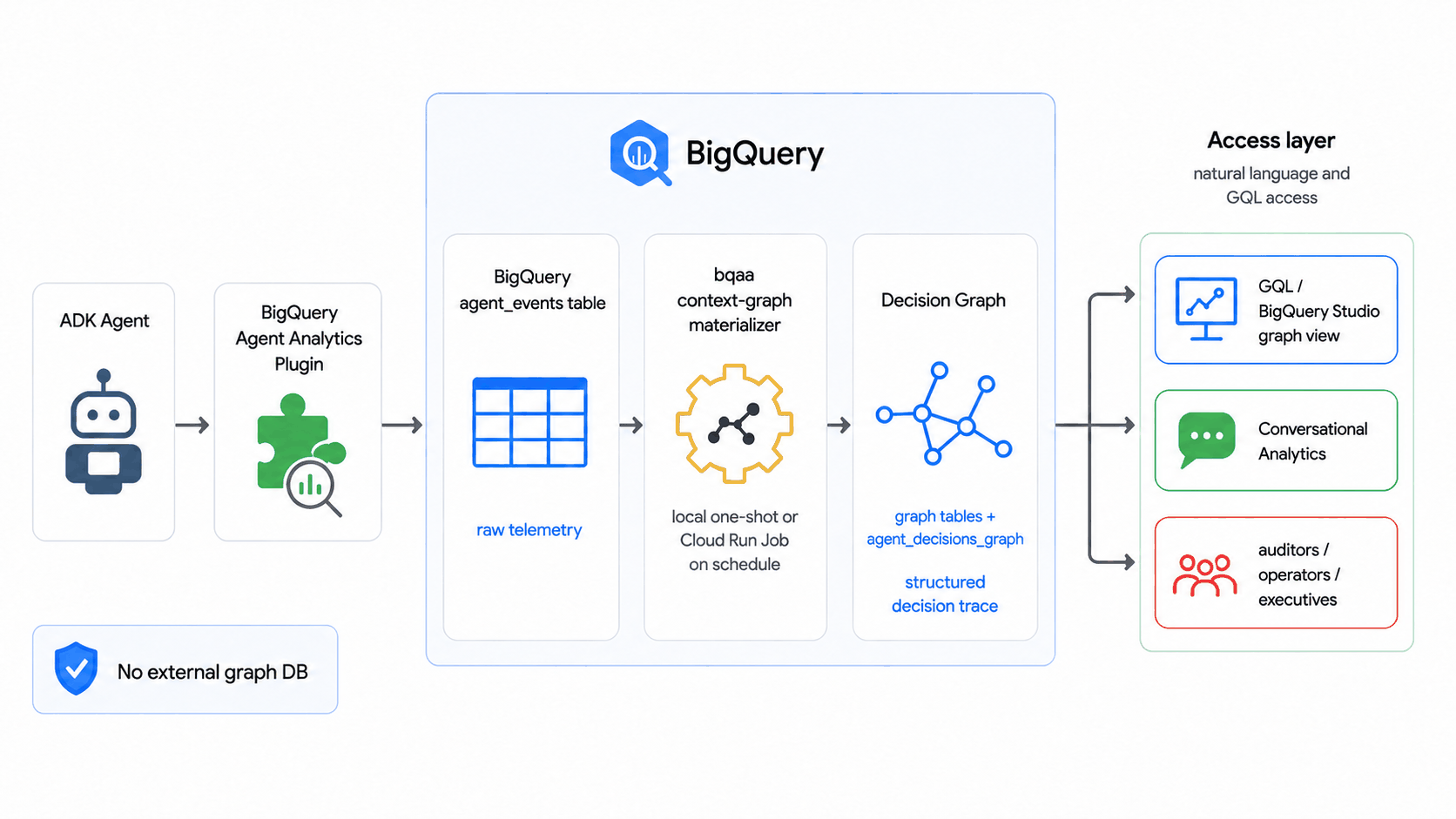
The graph is defined by two declarative artifacts — your table DDL and a CREATE
PROPERTY GRAPH schema — and the SDK's bqaa context-graph --property-graph
command derives the extraction (which entities and relationships to pull, and
their column types) from them plus your live table schemas. No separate ontology
or binding file is required for the common case; reach for an explicit
ontology.yaml / binding.yaml only when you need descriptions to steer the AI
prompt, entity inheritance, derived properties, or column renames.
Run it once locally, or on a schedule as a Cloud Run Job triggered by Cloud Scheduler — with split read-only-events / writable-graph datasets, least-privilege service accounts, structured JSON logs, and Cloud Monitoring alerts. The operational reference (prerequisites, the IAM matrix, recommended schedules, the JSON log shape, monitoring, and teardown) lives in the SDK repo:
- Periodic materialization codelab — build and query a decision graph end to end.
- Scheduled deploy runbook — take that graph to a hands-off scheduled deploy.
- Deploy reference (Cloud Run + Cloud Scheduler) — the full IAM matrix, schedules, monitoring, and the Terraform module.
Deploy to Agent Runtime with the plugin¶
You can deploy an agent with the BigQuery Agent Analytics plugin to Agent Runtime. This section walks through the steps to deploy using the ADK CLI, and alternatively using the Agent Platform SDK programmatically.
Version Requirement
Use ADK Python version 1.24.0 or higher to deploy with this plugin to Agent Runtime. Earlier versions had an issue where the plugin's asynchronous log writer could be terminated by the serverless runtime before flushing pending events. Starting from 1.24.0, the plugin performs a synchronous flush at the end of each invocation to ensure all events are written.
Prerequisites¶
Before deploying, ensure you have completed the general Agent Runtime setup, including:
- A Google Cloud project with the Agent Platform API and Cloud Resource Manager API enabled.
- A BigQuery dataset in the target project (or a cross-project dataset with the correct permissions).
- A Cloud Storage staging bucket for deployment artifacts.
- The deploying service account has the IAM roles listed in IAM permissions.
- Your coding environment is
authenticated with
gcloud auth loginandgcloud auth application-default login.
Step 1: Define the agent and plugin¶
Create your agent project folder with an App object that includes the plugin.
The App object is required for Agent Runtime deployments with plugins.
import os
import google.auth
from google.adk.agents import Agent
from google.adk.apps import App
from google.adk.models.google_llm import Gemini
from google.adk.plugins.bigquery_agent_analytics_plugin import (
    BigQueryAgentAnalyticsPlugin,
    BigQueryLoggerConfig,
)
from google.adk.tools.bigquery import BigQueryToolset, BigQueryCredentialsConfig

# --- Configuration ---
PROJECT_ID = os.environ.get("GOOGLE_CLOUD_PROJECT", "your-gcp-project-id")
DATASET_ID = os.environ.get("BQ_DATASET", "agent_analytics")
# BQ_LOCATION is the BigQuery dataset location (multi-region "US"/"EU" or
# a single region like "us-central1"). This is separate from the Agent Platform
# region used by GOOGLE_CLOUD_LOCATION.
BQ_LOCATION = os.environ.get("BQ_LOCATION", "US")

os.environ["GOOGLE_GENAI_USE_VERTEXAI"] = "True"

# --- Plugin ---
bq_analytics_plugin = BigQueryAgentAnalyticsPlugin(
    project_id=PROJECT_ID,
    dataset_id=DATASET_ID,
    location=BQ_LOCATION,
    config=BigQueryLoggerConfig(
        batch_size=1,
        batch_flush_interval=0.5,
        log_session_metadata=True,
    ),
)

# --- Tools ---
credentials, _ = google.auth.default(
    scopes=["https://www.googleapis.com/auth/cloud-platform"]
)
bigquery_toolset = BigQueryToolset(
    credentials_config=BigQueryCredentialsConfig(credentials=credentials)
)

# --- Agent ---
root_agent = Agent(
    model=Gemini(model="gemini-flash-latest"),
    name="my_bq_agent",
    instruction="You are a helpful assistant with access to BigQuery tools.",
    tools=[bigquery_toolset],
)

# --- App (required for Agent Runtime with plugins) ---
app = App(
    name="my_bq_agent",
    root_agent=root_agent,
    plugins=[bq_analytics_plugin],
)
google-adk[bigquery]
google-cloud-bigquery-storage
pyarrow
opentelemetry-api
opentelemetry-sdk
Step 2: Deploy using ADK CLI¶
Use the adk deploy agent_engine command to deploy the agent. The --adk_app
flag tells the CLI which App object to use:
PROJECT_ID=your-gcp-project-id
LOCATION=us-central1

adk deploy agent_engine \
    --project=$PROJECT_ID \
    --region=$LOCATION \
    --staging_bucket=gs://your-staging-bucket \
    --display_name="My BQ Analytics Agent" \
    --adk_app=agent.app \
    my_bq_agent
--adk_app flag
The --adk_app flag specifies the module path and variable name of the
App object (in the format module.variable). In this example, agent.app
refers to the app variable in agent.py. This ensures the deployment
correctly picks up the plugin configuration.
Once successfully deployed, you should see output like:
AgentEngine created. Resource name: projects/123456789/locations/us-central1/reasoningEngines/751619551677906944
Note the Resource name for the next step.
Step 3: Test the deployed agent¶
After deployment, you can query the agent using the Agent Platform SDK:
import uuid
import vertexai

PROJECT_ID = "your-gcp-project-id"
LOCATION = "us-central1"
AGENT_ID = "751619551677906944"  # from deployment output

vertexai.init(project=PROJECT_ID, location=LOCATION)
client = vertexai.Client(project=PROJECT_ID, location=LOCATION)

agent = client.agent_engines.get(
    name=f"projects/{PROJECT_ID}/locations/{LOCATION}/reasoningEngines/{AGENT_ID}"
)

user_id = f"test_user_{uuid.uuid4().hex[:8]}"
for chunk in agent.stream_query(
    message="List datasets in my project", user_id=user_id
):
    print(chunk, end="", flush=True)
Step 4: Verify events in BigQuery¶
After sending a few queries to the deployed agent, verify that events are being logged by querying your BigQuery table:
SELECT timestamp, event_type, agent, content
FROM `your-gcp-project-id.agent_analytics.agent_events`
ORDER BY timestamp DESC
LIMIT 20;
You should see events such as INVOCATION_STARTING, LLM_REQUEST,
LLM_RESPONSE, TOOL_STARTING, TOOL_COMPLETED, and INVOCATION_COMPLETED.
Alternative: Deploy using the Agent Platform SDK¶
You can also deploy programmatically using the Agent Platform SDK directly. This is useful for CI/CD pipelines or custom deployment workflows:
import vertexai
from my_bq_agent.agent import app

PROJECT_ID = "your-gcp-project-id"
LOCATION = "us-central1"
STAGING_BUCKET = "gs://your-staging-bucket"

vertexai.init(
    project=PROJECT_ID, location=LOCATION, staging_bucket=STAGING_BUCKET
)
client = vertexai.Client(project=PROJECT_ID, location=LOCATION)

remote_app = client.agent_engines.create(
    agent=app,
    config={
        "display_name": "My BQ Analytics Agent",
        "staging_bucket": STAGING_BUCKET,
        "requirements": [
            "google-adk[bigquery]",
            "google-cloud-aiplatform[agent_engines]",
            "google-cloud-bigquery-storage",
            "pyarrow",
            "opentelemetry-api",
            "opentelemetry-sdk",
        ],
    },
)
print(f"Deployed agent: {remote_app.api_resource.name}")
Troubleshooting¶
If events are not appearing in your BigQuery table after deployment:
-
Check ADK version: Ensure
google-adk>=1.24.0is in your requirements. Earlier versions do not flush pending events before the serverless runtime suspends the process. -
Enable debug logging: Add the following to the top of your
agent.pyto surface any silent errors: -
Check IAM permissions: The Agent Runtime service account needs
roles/bigquery.dataEditoron the target table androles/bigquery.jobUseron the project. For cross-project logging, also ensure the BigQuery API is enabled in the source project and the service account hasbigquery.tables.updateDataon the destination table. -
Verify plugin initialization: In Cloud Logging, filter by
resource.type="reasoning_engine"and look for plugin startup messages or error logs. -
Use immediate flush for debugging: Set
batch_size=1andbatch_flush_interval=0.1inBigQueryLoggerConfigto rule out buffering issues.
Security: Avoid logging sensitive credentials¶
Do not log OAuth tokens, API keys, or client secrets
The BigQuery Agent Analytics plugin captures detailed event payloads,
including tool arguments, LLM prompts, and authentication-related events
(such as HITL credential requests). If your agent uses authenticated
tools (e.g., AuthenticatedFunctionTool with OAuth2), the plugin may log
sensitive values such as client_secret, access_token, or API keys into
the content column of your BigQuery table.
This is a known concern (google/adk-python#3845) and can lead to credential exposure in your analytics data.
The plugin includes built-in redaction that automatically protects common secrets. For additional control, you can layer custom redaction on top.
Built-in redaction¶
The plugin automatically redacts values for the following well-known key names
(case-insensitive) wherever they appear in content or attributes JSON:
client_secret, access_token, refresh_token, id_token, api_key,
password
In addition, any state key prefixed with temp: or secret: is
automatically replaced with [REDACTED] in the logged state_delta. This means
ADK session state stored under the secret: scope (such as OAuth tokens cached
by credential services) is never persisted in BigQuery.
No configuration required
Built-in redaction is always active for structured attributes and state
logging, and applies recursively to nested dictionaries and JSON-encoded
strings within attribute values. Custom content_formatter runs first
on raw content, so use it to add masking for secrets that may appear in
free-form payloads.
Use content_formatter to redact additional secrets¶
Provide a custom content_formatter function in BigQueryLoggerConfig to strip
or mask sensitive fields before they are written:
```python
import json
import re
from typing import Any

SENSITIVE_KEYS = {"client_secret", "access_token", "refresh_token", "api_key", "secret"}

def redact_credentials(event_content: Any, event_type: str) -> str:
    """Redact OAuth secrets and tokens from logged content."""
    if isinstance(event_content, dict):
        text = json.dumps(event_content)
    else:
        text = str(event_content)

    for key in SENSITIVE_KEYS:
        # Redact values in JSON-like strings: "client_secret": "GOCSPX-xxx"
        text = re.sub(
            rf'("{key}"\s*:\s*)"[^"]*"',
            rf'\1"[REDACTED]"',
            text,
            flags=re.IGNORECASE,
        )
    return text

config = BigQueryLoggerConfig(
    content_formatter=redact_credentials,
    # ... other options
)
```
import com.google.adk.plugins.agentanalytics.BigQueryLoggerConfig;
import java.util.function.BiFunction;
import java.util.Set;

Set<String> SENSITIVE_KEYS = Set.of("client_secret", "access_token", "refresh_token", "api_key", "secret");

BiFunction<Object, String, Object> redactCredentials = (content, eventType) -> {
  String text = content.toString();
  for (String key : SENSITIVE_KEYS) {
    // Redact values in JSON-like strings: "client_secret": "GOCSPX-xxx"
    text = text.replaceAll(
        "(?i)(\"" + key + "\"\\s*:\\s*)\"[^\"]*\"",
        "$1\"[REDACTED]\""
    );
  }
  return text;
};

BigQueryLoggerConfig config = BigQueryLoggerConfig.builder()
    .contentFormatter(redactCredentials)
    // ... other options
    .build();
Use event_denylist to skip credential events¶
If you do not need to log authentication-related events, exclude them entirely:
General best practices¶
- Never hardcode secrets in agent source code. Use environment variables or a secret manager (e.g., Google Cloud Secret Manager) for OAuth client secrets and API keys.
- Restrict BigQuery table access using IAM to limit who can read logged event data.
- Audit your logs periodically to verify no unexpected sensitive data is being captured.
Operations¶
Tracing and observability¶
The plugin populates the trace_id, span_id, and parent_span_id columns on
every emitted row so the parent-child execution tree (Agent → LLM call / Tool
call) reconstructs cleanly from BigQuery.
- Internal span tracking, no OTel span export. The plugin tracks the
parent-child hierarchy on its own internal stack of 16-hex
span_idvalues. The root invocation span reuses the ambient OTel span's id when one is active (so it lines up with the runner's invocation span); child BQAA spans are generated internally. It does not calltracer.start_span(...)on any configured OpenTelemetryTracerProvider, so its instrumentation never reaches your configured exporter — this is what prevents duplicate spans in Cloud Trace when Agent Engine telemetry is enabled (GOOGLE_CLOUD_AGENT_ENGINE_ENABLE_TELEMETRY=true) or when you wire any other Cloud Trace exporter into the host process. trace_idinherited from the ambient OTel span when present. If the surrounding runtime has already started an OTel span — Agent Engine's invocation span, the ADKRunnerinvocation span, or any span you opened before the agent runs — the plugin reads itstrace_idand stamps it on every BigQuery row. BigQuery rows therefore join cleanly to your existing Cloud Trace traces via a sharedtrace_id.- Fallback when no ambient span is present. If no ambient OTel span is
active (e.g. a non-Agent-Engine deployment with no host-side tracer
configured), the plugin generates a per-invocation 32-hex
trace_idso the parent-child hierarchy is always preserved in BigQuery, even without any external tracer setup. - No
TracerProvideris required. Configuring an OpenTelemetryTracerProviderin your host process is optional. It only matters if you want the plugin'strace_idto be sourced from your own pre-existing ambient span (e.g. to correlate against telemetry from non-ADK services). The plugin no longer needs the provider for its own bookkeeping.
If you relied on the plugin to feed your OTel exporter
Some older configurations used the BQAA plugin as a side channel for
OpenTelemetry span emission — that path is intentionally gone. Configure
OTel instrumentation in the host application instead (Agent Engine wires
this automatically; for local deployments use ADK's own framework
instrumentation or an explicit TracerProvider). The plugin's BigQuery
rows will continue to join to your traces via trace_id.
Public methods¶
The plugin exposes several public methods for lifecycle management:
await plugin.flush(): Flush all pending events to BigQuery. Call this before shutdown to avoid data loss.await plugin.shutdown(timeout=None): Gracefully shut down the plugin, flushing pending events and releasing resources. The optionaltimeoutparameter overridesshutdown_timeoutfrom the config.await plugin.create_analytics_views(): Manually (re-)create all per-event-type analytics views. Useful after a schema upgrade or when views need to be refreshed.plugin.get_drop_stats(): Return a snapshot of dropped-event counts perdrop_reason. See Dropped-event observability below.-
Async context manager: The plugin supports
async withfor automatic startup and shutdown:
In Java, the plugin lifecycle is managed via the close() method (inherited from Plugin), which returns an RxJava Completable.
plugin.close(): Gracefully shuts down the plugin, flushing pending events and releasing resources (including the BigQuery write client and executors).- Automatic Closure: If you are using
InMemoryRunner, callingrunner.close()will automatically close all registered plugins, including the BigQuery Agent Analytics plugin.
Dropped-event observability¶
BigQuery logging is best-effort — events can be dropped when the in-memory
queue overflows or when a write ultimately fails. The plugin tracks dropped
rows per drop_reason and exposes a polling API so a host can detect, alert
on, and ship the counts to its own monitoring.
Drop reasons:
| Reason | Cause |
|---|---|
queue_full |
The in-memory batch queue overflowed (host produces events faster than the drainer can ship). Increase queue_max_size on BigQueryLoggerConfig, raise batch_size to drain in larger chunks, or scale the consumer side (more concurrent invocations finishing faster). |
arrow_prep_failed |
A row could not be converted to its Arrow representation (typically schema/type mismatch). Inspect logs for the offending field. |
retry_exhausted |
The Storage Write API call kept returning a retryable error (e.g. transient gRPC failures) until the retry budget was used up. |
non_retryable |
Storage Write API returned a non-retryable error (permissions, quota, schema rejection). Usually requires operator intervention. |
unexpected_error |
Any other exception caught while preparing or writing the batch. |
Reading the counts:
# Snapshot of {drop_reason: count} since plugin start.
stats = plugin.get_drop_stats()
# Example: {"queue_full": 12, "retry_exhausted": 0, ...}

total_dropped = sum(stats.values())
Exporting to your monitoring system — poll periodically and ship the deltas:
import asyncio

async def export_loop(plugin):
    last = {k: 0 for k in (
        "queue_full", "arrow_prep_failed",
        "retry_exhausted", "non_retryable", "unexpected_error",
    )}
    while True:
        current = plugin.get_drop_stats()
        for reason, count in current.items():
            delta = count - last.get(reason, 0)
            if delta:
                # e.g. metric_client.write_point(
                #         metric="bqaa_dropped_events",
                #         labels={"reason": reason}, value=delta)
                ...
        last = current
        await asyncio.sleep(60)
A non-zero queue_full or retry_exhausted count on a sustained basis is the
clearest signal that BQAA is at risk of data loss — surface it on a dashboard or
alert.
Multiprocessing and fork safety¶
The plugin is fork-aware: it sets GRPC_ENABLE_FORK_SUPPORT=1 before loading
the gRPC C-core library and registers an os.register_at_fork handler that
resets inherited runtime state (gRPC channels, write streams, event loops) in
child processes. This means the plugin can survive os.fork() without leaking
file descriptors or sending data on a parent's connection.
However, spawn is the recommended multiprocessing start method for
production deployments. fork copies the parent's address space, including any
in-flight gRPC state, and the post-fork reset adds latency to the first write in
each child. With spawn, each worker initializes the plugin cleanly.
For Gunicorn deployments specifically:
- Prefer
--preloadcombined with lazy plugin initialization (the plugin defers setup until the first event is logged), or - Initialize the plugin inside a
post_forkhook so each worker gets its own client.
Note
The fork-safety mechanism resets runtime state only. It does not replay
events that were queued but not yet flushed in the parent process at the
time of fork. Call await plugin.flush() before forking if you need to
guarantee delivery.
Additional ways to consume logged data¶
BigQuery Agent Analytics SDK¶
The BigQuery Agent Analytics SDK provides a programmatic way to consume and analyze the data logged by the plugin. Use the SDK for:
- Agent evaluation: Compare agent runs against expected outcomes
- Golden trajectory matching: Validate that agent execution paths match approved sequences
- Trace visualization: Reconstruct and visualize agent execution flows from logged spans
Build a dashboard¶
The BigQuery Agent Analytics SDK includes an example Jupyter notebook that demonstrates how to query and visualize your agent's performance data. Use it as a starting point to build your own custom dashboards tailored to your BigQuery Agent Analytics dataset. You can also publish the notebook as an interactive dashboard using Colab Data Apps.
Feedback¶
We welcome your feedback on BigQuery Agent Analytics. If you have questions, suggestions, or encounter any issues, please reach out to the team at bqaa-feedback@google.com.